Mitel UK Demonstration Website
Demo Scripts
Hospitality Demonstration
Contact Center AI
This AI demo is to show Self-Service capabilities and can be completed without the need of any Mitel applications. Once you have accessed the MiHospitality Site, you will see the Mitel Chat Overlay labelled "Chat Now". Once selected, follow the below Self-Service script.
Note: If you have access to Ignite and want to show "Agent Assist" feature, you can just type in "Chat to Agent"
MiHospitality web site
https://www.mitelukdemo.com/mihospitality-dining


Hospitality Demonstration
Contact Center "Web Call-back " demo
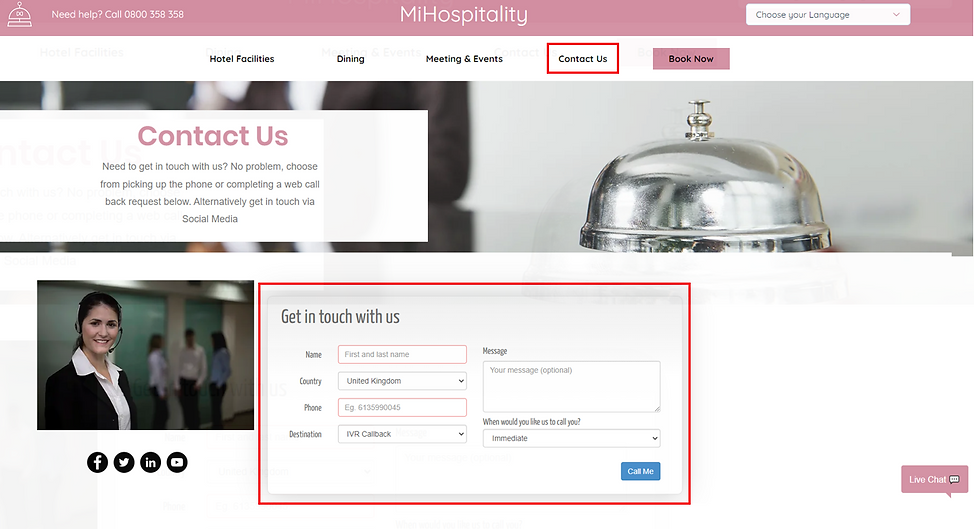
To perform a Web Call-back demonstration, you need to be on the Contact Us page of the MiHospitality website. A Mitel SE will be required so perform this demonstration as the call-back request will be presented to an Agent in the Ignite interface.
Fill in some details within the form as highlighted and the call-back will be submitted into the IVR Call-back queue. The SE will need to make themselves present within this queue for it to work.